


Let’s be honest—B2B software with complex onboarding is a beast. You know the type. It’s powerful, it’s feature-rich, and it promises to transform workflows. But the first time a new user logs in? They feel like they’ve stumbled into a cockpit with no training. And that’s where support strategies come in. Not just any support—strategies that actually work when the learning curve feels like a cliff.
Here’s the deal: if your onboarding is a maze, your churn rate will skyrocket. I’ve seen it happen. A client invests in your tool, gets excited, then hits a wall. They don’t leave because your software is bad—they leave because they couldn’t figure it out. So, how do you fix that? You build a support system that holds their hand, but doesn’t smother them. Let’s dive into some real strategies.
Why complex onboarding is a double-edged sword
Complex onboarding isn’t inherently evil. In fact, it often signals depth. Your software does a lot—maybe it integrates with CRMs, automates workflows, or handles massive datasets. That’s gold. But the complexity? It’s a friction point. Think of it like assembling IKEA furniture without the little Allen wrench. You have all the pieces, but the instructions are vague, and your patience runs thin.
For B2B, the stakes are higher. You’re not just selling to one person—you’re selling to a team. And if the onboarding stumbles, the whole organization feels it. That’s why your support strategy needs to be proactive, not reactive. You can’t wait for them to call crying for help. You need to be there before they even realize they’re lost.
Strategy #1: The “concierge” onboarding model
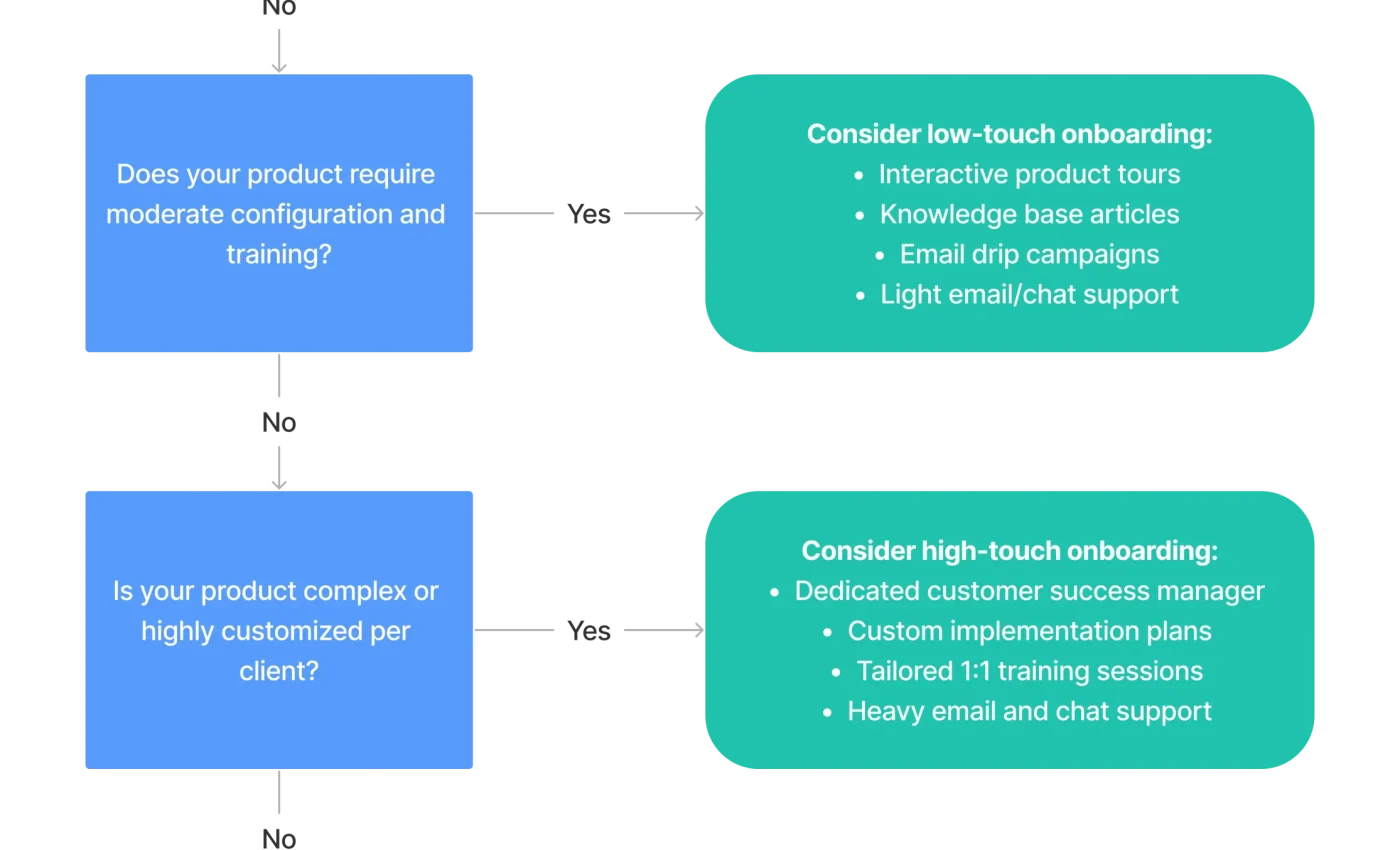
Okay, so this one sounds fancy, but it’s pretty simple. Instead of handing over a login and a PDF manual, assign a real human to guide them. I mean, a dedicated onboarding specialist. This person isn’t just tech support—they’re a coach. They walk the user through the first few weeks, answer questions in real-time, and even set up initial configurations.
Why does this work? Well, it builds trust. When a user feels like someone has their back, they’re more likely to push through the tough parts. Plus, you can catch misunderstandings early. For example, if they keep clicking the wrong button, your specialist can correct the course before it becomes a habit. Honestly, it’s a game-changer for complex software.
But what if you can’t afford a full-time concierge?
Sure, not every company has the budget for a dedicated team. That’s fair. You can still create a “light” version. Use a combination of automated emails, video walkthroughs, and a chatbot that escalates to a human when needed. The key is to make the user feel guided, not abandoned. Even a weekly check-in call from a support rep can work wonders.
Strategy #2: Gamify the onboarding process
I know, gamification sounds like a buzzword from 2015. But hear me out. When you’re dealing with complex onboarding, users need motivation. And nothing motivates like a little progress bar or a badge. Think of it like leveling up in a video game. Each completed step—setting up a profile, running a report, integrating a tool—unlocks the next stage.
You can even tie it to real rewards. For instance, after finishing the first three modules, offer a free consultation or a discount on premium features. The goal is to make the onboarding feel less like a chore and more like a journey. And honestly, it works because humans are wired to seek completion. We hate leaving things unfinished.
One caveat: don’t overdo it. If the gamification feels forced or gimmicky, users will roll their eyes. Keep it subtle. A simple checklist with a “100% complete” flag can be surprisingly effective.
Strategy #3: Create a “sandbox” environment
Here’s a thought: what if users could break things without consequences? That’s the idea behind a sandbox environment. It’s a replica of your software where users can experiment freely. No data loss, no real-world impact. Just pure exploration.
For B2B software with complex onboarding, this is a lifesaver. Users can test workflows, try out integrations, and make mistakes—all without fear. And mistakes are actually good here. They teach you what not to do. Plus, when a user figures something out on their own, they feel a sense of ownership. That’s powerful.
You can pair this with guided tutorials. For example, the sandbox might have pre-loaded sample data and a “mission” to complete. “Build a report that shows sales trends for Q3.” It’s like a training ground. And when they’re ready, they can switch to the live environment with confidence.
Strategy #4: Use data to predict pain points
Alright, this one’s a bit techy, but stick with me. Your software generates data—user clicks, time spent on pages, features that are ignored. That data is a goldmine. You can analyze it to see exactly where users get stuck. Maybe 70% of new users abandon the setup wizard at step four. That’s a red flag.
Once you identify those pain points, you can intervene. Add a pop-up tip at step four. Send a personalized email saying, “Hey, we noticed you paused here—here’s a quick video.” Or even trigger a live chat invitation. The goal is to smooth out the rough edges before they become deal-breakers.
I’ve seen companies reduce onboarding time by 40% just by fixing one or two friction points. It’s not magic—it’s just listening to what the data is screaming.
Strategy #5: Build a knowledge base that doesn’t suck
Let’s be real: most knowledge bases are terrible. They’re full of jargon, outdated screenshots, and explanations that assume you already know the basics. For complex onboarding, you need a knowledge base that’s actually… helpful. Think of it like a friendly coworker who explains things in plain English.
Structure it around tasks, not features. Instead of “How to use the API,” write “How to sync your CRM with our tool.” Use screenshots, GIFs, and short videos. And include a search bar that actually works. You’d be surprised how many companies skip that.
Also, consider adding a “common mistakes” section. For example, “Why your report might show zero data—and how to fix it.” That kind of empathy goes a long way. Users don’t want to feel stupid; they want solutions.
Strategy #6: Offer tiered support for different user personas
Not all users are the same. You’ve got the power user who wants to dive into advanced settings, and you’ve got the casual user who just needs the basics. Your support strategy should reflect that. Create different onboarding paths based on roles or goals.
For example, an admin might need a deep dive into permissions and security. A regular team member might just need to know how to submit a request. By segmenting your support, you avoid overwhelming people with irrelevant info. It’s like a choose-your-own-adventure book—but for software.
You can even use a quick quiz at signup: “What’s your primary role?” Then tailor the onboarding accordingly. It’s simple, but it makes a huge difference in user satisfaction.
Putting it all together: A sample support flow
Let’s imagine a user signs up for your complex B2B software. Here’s what a solid support strategy might look like:
- Day 1: Welcome email with a link to a sandbox environment and a 5-minute video overview.
- Day 2: A personalized onboarding specialist sends a calendar invite for a 30-minute call.
- Day 3: The user completes a gamified checklist (profile setup, first report).
- Day 5: Data analysis detects they’re stuck on integration—triggered an automated tip.
- Day 7: Specialist follows up, answers questions, and introduces advanced features.
- Day 14: User receives a “graduation” badge and access to a community forum.
It’s not rocket science. It’s just thoughtful, layered support that meets users where they are.
The hidden cost of ignoring onboarding
Here’s something people don’t talk about enough: poor onboarding doesn’t just lose customers—it burns your support team out. When users are constantly confused, your support tickets pile up. Your team gets frustrated. And you end up spending more on reactive support than you would on proactive strategies.
I’ve seen companies spend thousands on fancy features, only to watch them gather dust because no one knew how to use them. That’s a waste. Investing in onboarding support is like oiling a machine—it keeps everything running smoothly.
A final thought on complexity
Complex software doesn’t have to mean a painful experience. In fact, the complexity can become a selling point—if you frame it right. “Our tool does more, and we’ll help you master it.” That’s the message. Support isn’t a cost center; it’s the bridge between confusion and confidence.
So, take a hard look at your onboarding. Are you guiding users or just throwing them into the deep end? The best B2B software companies don’t just sell a product—they sell a path to success. And that path starts with support that’s as thoughtful as the software itself.
Remember, it’s not about being perfect. It’s about being present. And honestly, that’s the most human thing you can do.


